
How To Use Alisync Step By Step
I. Configuration Page:
*** Step 1: In the configuration page, answer the question below, Alisync formulas will be changed according to your answer.

*** Step 2: Set the currency and rate.
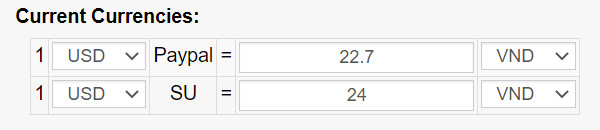
For example: you are living in Vietnam, 1 USD Paypal can be withdrawn to Vietnamese Dong (VND) is 22.7 and to pay 1 dolar on Aliexpress (SU), you have to pay 24VND. You can change your currency and the rate whatever you want.
*Note: In case your ebay account is from USA with ebay managed payments. You just input the rate to Paypal box then confirm with Alisync, we will update the code inside to make sure that the result close as close possible. (this function is only available for paid plan)
*** Step 3: Set the minimum profit percentage.

Tell Alisync how much percentage which you want, Alisync will suggest you how much you should list the item on eBay.
After finish these 3 steps, click on “update info” button at bottom of the page. These basic information will be applied for all listings in that account.
II. Supplier Page
After setting up everything on configuration page, then click to supplier page and follow these steps below.
*** Step 1: Input Aliexpress URL:
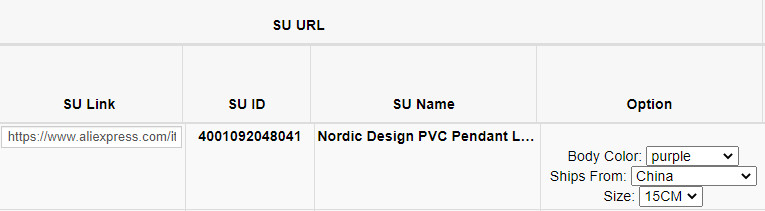
Find out which item you wish to do dropshipping, input its URL to “SU Link” box, hit enter. Alisync will show up:
+ SU ID: this is the item ID on Aliexpress, you can search out the item by enter this ID into Aliexpress searching box.
+ SU Name: The title of Aliexpress listing.
+ Option: the variations of Aliexpress listing. Choose one of them. If there is no variation, this column will be blank.
*** Step 2: Check every value in logical operations area
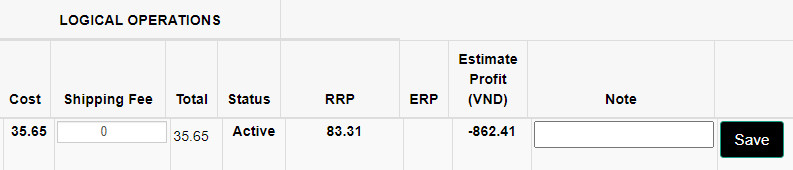
After you enter the Aliexpress link in step 1, take a look at logical operations area, Alisync will show up:
+ Cost: the price of Aliexpress listing.
+ Shipping Fee: The cheapest shipping method ship to USA only.
+ Total: this value is sum between Cost and Shipping Fee.
+ Status: The status of Aliexpress “active” or “inactive”.
+ RRP: Recommended Retail Price. This value suggest you how much you should list the item on eBay to earn at least the minimum profit percentage which was set in Configuration page before.
+ ERP: Ebay Real Price. The eBay real price after you list the item on eBay. In this case, it is blank, value is 0 because you have not list eBay item yet.
+ Estimate Profit: Alisync can calculate really exactly. In this case, you can see it is a negative value because we have not list on eBay yet.
Note: This value does not include ads fee on eBay, please separate it.
*** Step 3: List the item on eBay and input eBay ID into Alisync.
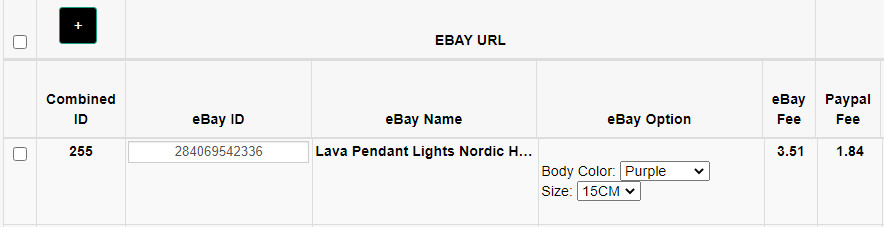
After input eBay ID into eBay ID box, Alisync will show up:
+ eBay Name: The title of eBay listing.
+ eBay Option: the variations of eBay listing. Choose one of them. If there is no variation, this column will be blank.
+ eBay Fee: This is eBay final value fee.
+ Paypal Fee: This is international Paypal fee. or fee per order (applied for USA account via ebay managed payment).
After input eBay Id, take a look back to ERP and estimated profit values, they will be changed accordingly.
Note: After you list ebay items, you need to wait few minutes for eBay to index your listings. Then Alisync can show up your information.
*** Step 4: Remember to click on “Save” button at the end of every row to save your data.
III. All functions and filters:

On the supplier page. There are 7 buttons which can be explained below:
+ Export Data: click on this if you want to download all your data from supplier page. Alisync will export an excel file for you.
+ Ali Inactive: click on this if you want to filter all the inactive Aliexpress listings.
+ eBay Inactive: click on this if you want to filter all the inactive eBay listings.
+ Non Profit Item: click on this if you want to filter all rows which has negative estimated profit value.
+ Sync Ali: click on this if you want Alisync update all Alisync listing status. it will take time.
+ Sync Ebay: click on this if you want Alisync update all eBay listing status. it will take time.
+ Delete: click on this if you want to delete multi rows at a same time.
